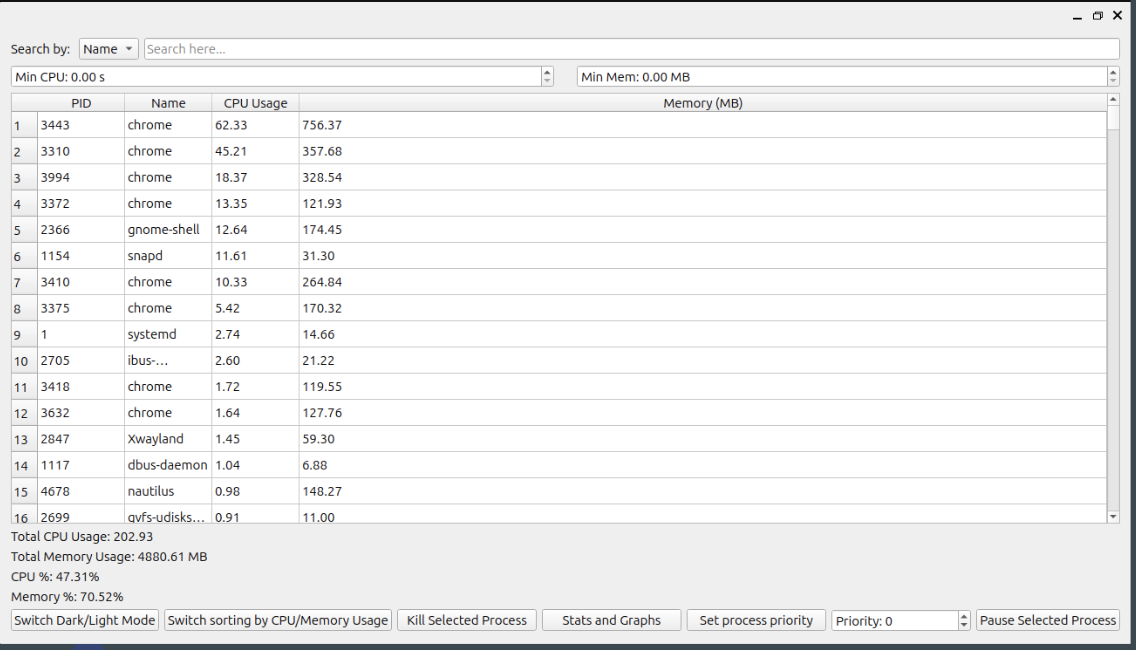
Linux Process Manager (LPM) is a desktop application developed in C++ using the Qt5 framework that provides real-time visualization and control of system processes on Linux. Inspired by tools like htop, ps, and GNOME System Monitor, LPM aims to balance performance efficiency with user-friendliness by combining a lightweight backend with a clean, customizable GUI.
At its core, LPM continuously parses data from the /proc filesystem every two seconds, extracting process metadata such as CPU usage, memory consumption, and runtime status. The main interface displays a live process table with sortable columns, filtering options, and a search bar to locate processes by name or PID. Users can sort by CPU or memory, and apply threshold-based filters to isolate high-resource-consuming processes.
Interactive Controls
We implemented a suite of interactive controls to make process management more accessible:
- Kill (SIGKILL), Pause (SIGSTOP), or Resume (SIGCONT) processes directly from the interface
- Renicing (changing process priority) via an integrated spinbox that lets users set nice values from -20 (high priority) to 19 (low priority)
- Graceful permission error handling via pop-up dialogue when trying to renice system processes without root
Stats and Graphs
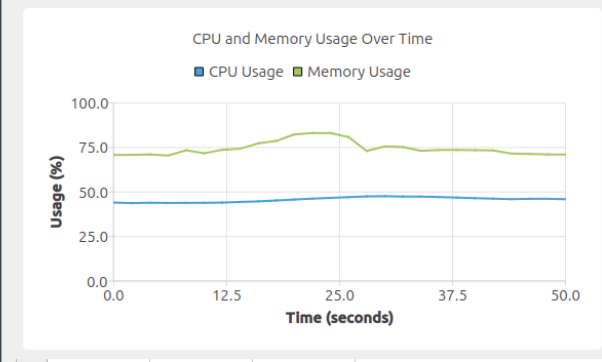
LPM includes a separate “Stats and Graphs” window that uses QtCharts to render live CPU and memory utilization graphs. These charts help users monitor performance trends over time, making it easier to detect bottlenecks or spikes. Users can toggle between light and dark themes, enhancing readability across environments.
What Sets LPM Apart
Unlike many system monitors that overwhelm users with unnecessary data (like detailed disk/network info), LPM focuses strictly on process-related stats and controls. Every feature, from the live refresh to the search filter, was chosen based on user surveys and a deep dive into the limitations of existing tools like Glances and lxtask.
Reflection
Throughout development, we exceeded our original scope. Features like pause/resume and priority setting were not planned in our Phase I timeline, but we successfully incorporated them based on user need. This project taught us a lot about the structure of Linux’s /proc filesystem, signal handling, real-time UI updates, and privilege management.
GitHub: github.com/andrew6255/OS_Project
